Get paid before the awkward follow-up.

InvoiceGuard sends the deposit link, gets the late-fee contract signed, then runs the reminders until your client pays.

$ pip install invoiceguard

After you press send

A daily run checks what is overdue and sends the next notice. Each stage goes out once. Paid invoices drop out on their own.

WhenWhat goes outHow
Before work starts The contract, signed on a one-time link, and a Stripe deposit link Sent by you, once
Day 1 past due A polite nudge with the payment link Email
Day 7 past due A firmer reminder, with the late fee itemized Email
Day 15 past due A formal notice quoting the signed clause Email and text
The moment they pay The invoice flips to paid, the ledger updates, the chasing stops Automatic

Part payments count. The reminders keep chasing whatever balance is left, and stop at zero.

What it does

Ten shipped features, grouped by the job they do. The suite behind them runs 152 tests.

Before the first hour of work

Stripe deposit links
invoiceguard invoice create --kind deposit builds a real Stripe payment link and tags it with the invoice id, so the payment finds its way back. Test mode works end to end.
Late-fee contracts
Every project generates a contract with your late-fee rate and grace period. Fees accrue monthly on overdue balances and show up itemized, never as a surprise.
E-signature capture
The client signs on a one-time link: typed name, drawn signature. The signed text is hashed with SHA-256 and stored as tamper evidence. Stated plainly, it is a captured signature, not a qualified third-party e-signature service.

While the clock runs

3-stage collections
A polite nudge on day 1, a firmer reminder on day 7, a formal notice on day 15, sent by invoiceguard check-due. The templates are plain markdown you can edit. No stage ever fires twice.
SMS and WhatsApp escalation
The day-15 notice also goes out as a short text through Twilio, if you configure it. invoiceguard invoice notify sends the same reminder on demand, with a --dry-run preview first.
Partial payments and the ledger
invoiceguard invoice record-payment logs part of a bill. The ledger tracks what came in, the invoice reads partially-paid, and the reminders chase only what is left.

Proof and paperwork

Webhook auto-paid
Stripe confirms the payment, the webhook lands, the invoice marks itself paid. Signatures are checked with real HMAC verification. No polling, no refreshing.
Receivables report and CSV
invoiceguard invoice report ages every open balance, oldest debt first, with accrued late fees and per-client totals. --csv exports the invoices and the payment ledger for your accountant.
Exact money
Amounts are stored as exact decimals and rounded half-up, never as floats. A cent is a cent, on every line of the ledger.
Localhost dashboard
The same books in a browser: the invoice list, per-invoice timelines, paid and outstanding totals, the payment ledger. It serves from your machine. There is no account and no cloud.

Run it on a real job

The actual commands, in order, on a sample engagement. Amounts are illustrative.

# Once: install and set up
$ pip install invoiceguard
$ invoiceguard init

# Before work: client, contract, deposit link
$ invoiceguard client add --name "Alder Street Bakery" --email billing@alderstreet.example
$ invoiceguard project create --client "Alder Street Bakery" \
    --title "Menu boards and signage" --amount 2500 --deposit-pct 50 --late-fee-pct 1.5
$ invoiceguard invoice create --project 1 --kind deposit
# invoice 1: $1,250.00 due. Deposit link sent.

# After the due date: the daily run does the chasing
$ invoiceguard check-due
# day 1 nudge, day 7 reminder, day 15 formal notice (email, plus text if configured)

# When the money lands: recorded by webhook, or by hand
$ invoiceguard invoice record-payment 1 --amount 1250 --method bank

# Anytime: who owes what
$ invoiceguard invoice report --csv receivables.csv

The dashboard

The real app, running locally on seeded demo data. Every sample client in it is labeled (demo).

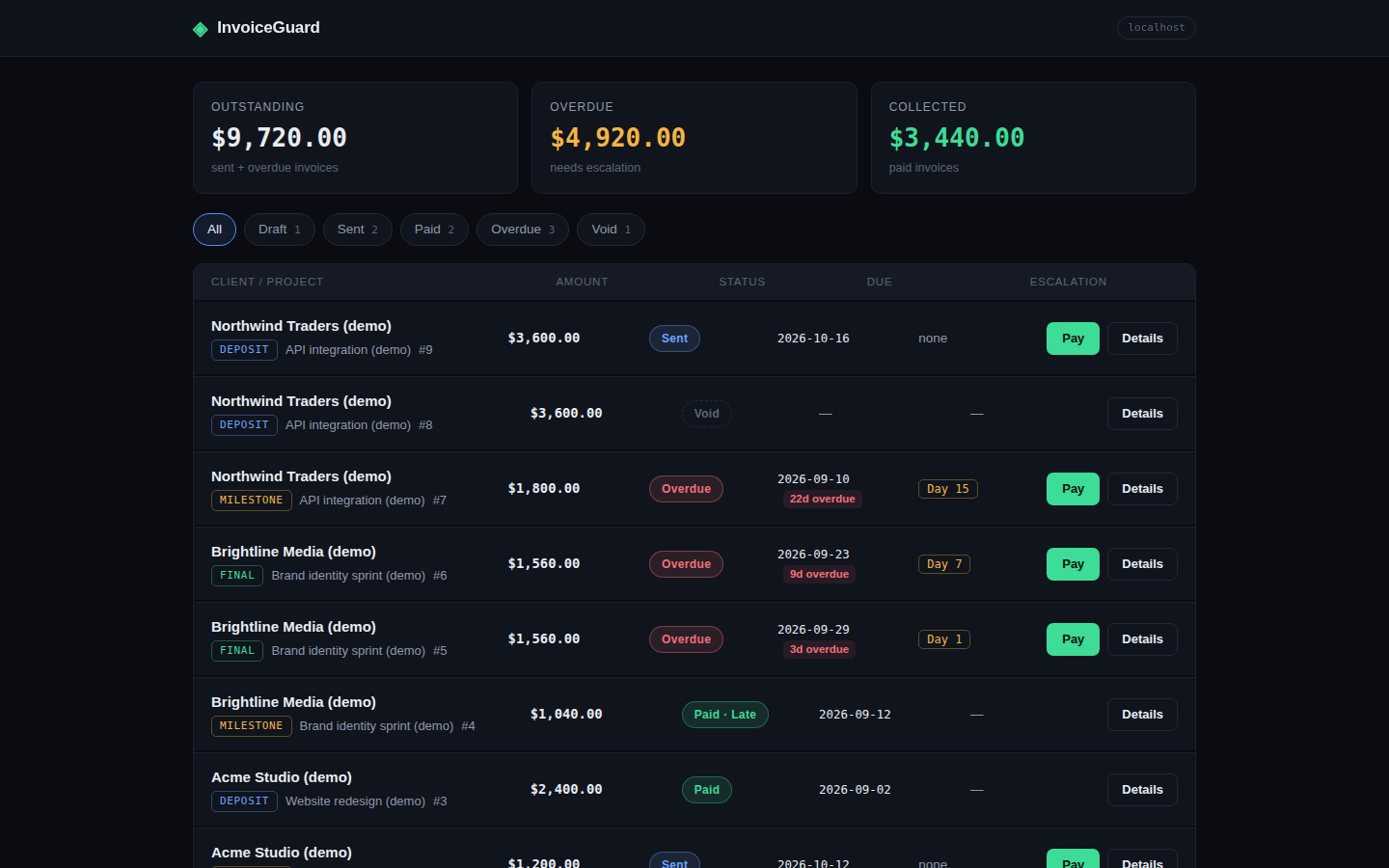
InvoiceGuard dashboard showing the invoice list
Invoice list. Every open invoice, its stage, and what is still owed.
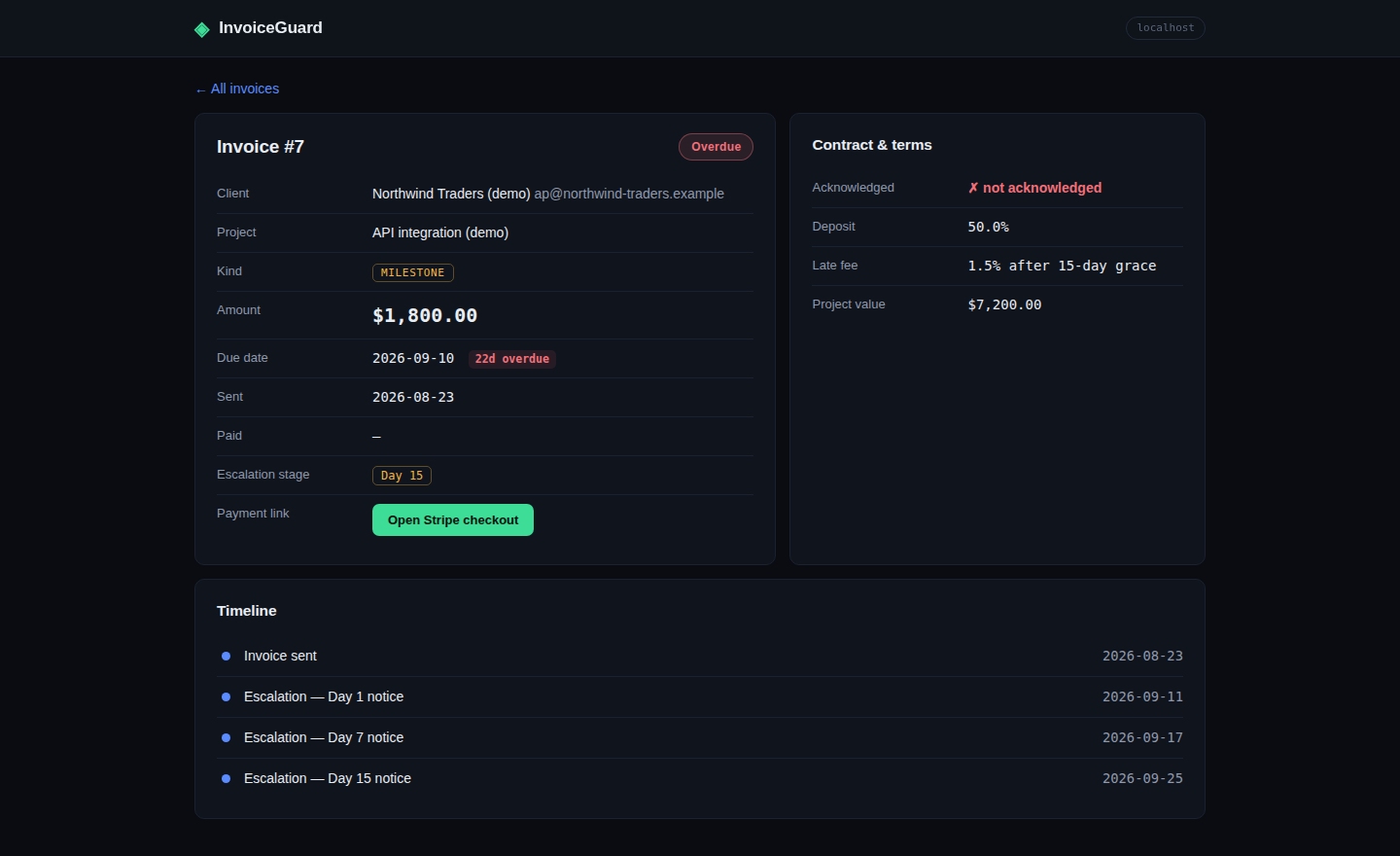
InvoiceGuard dashboard showing one invoice and its timeline
Invoice detail. Amount, due date, payment link, and every notice the invoice has sent.
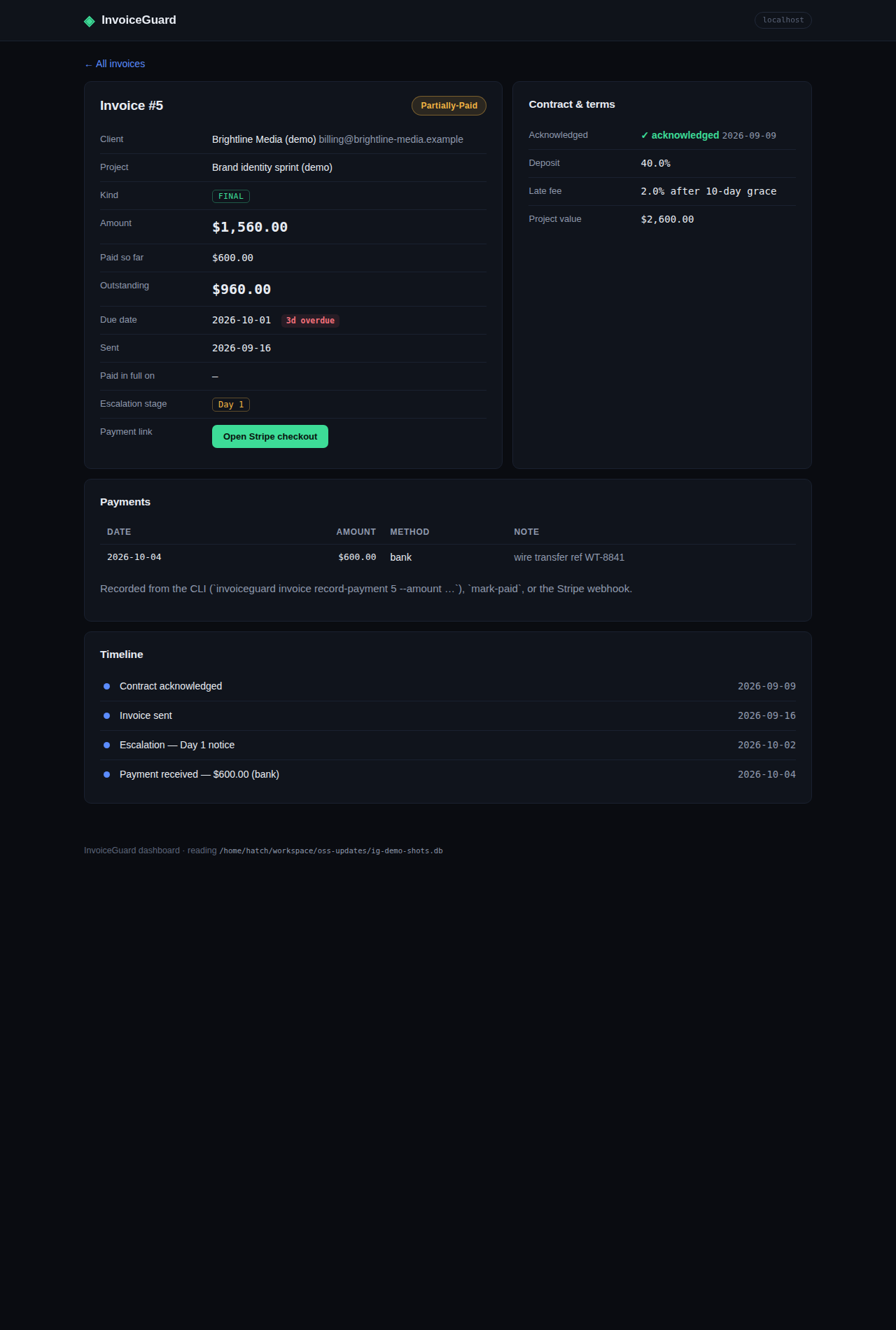
InvoiceGuard dashboard showing a part-paid invoice and its payment ledger
Partial payments. A part-paid invoice, with the ledger keeping the balance honest.

The fine print

What InvoiceGuard does not do, in writing.

  • The e-signature is a captured signature: typed name, drawn signature, and a SHA-256 hash of the signed text as tamper evidence. It is not a qualified third-party e-signature service.
  • Live Stripe calls were not verified in the build environment. Payment links are tested against a mocked SDK, webhook signatures against real HMAC checks. You bring your own test key.
  • Email leaves through your SMTP provider. Deliverability is yours.
  • Texts need your own Twilio account, and should only go to clients who agreed to be contacted.
  • Whether a late fee holds up depends on where you and your client are. The contract clause is a starting point, not legal advice.

Questions, answered plainly

Is InvoiceGuard free?

Yes. It is open source under the Apache-2.0 license. Use it, modify it, no account, no subscription. Stripe charges its own fees on real payments, as with any Stripe integration.

Do I need Stripe to use it?

For payment links, yes. Contracts, reminders, and the dashboard work without it. Stripe test mode runs the whole flow on test keys before any real money moves.

Where does my data live?

In a SQLite database on your own machine, at ~/.invoiceguard/invoiceguard.db by default. There is no cloud account, and nothing phones home.

Is the signature legally binding?

The client signs in the browser: typed name, drawn signature, and the exact signed text hashed with SHA-256 as tamper evidence. It is a captured signature, not a qualified third-party service like DocuSign. Legal weight varies by jurisdiction.

How do the collection emails get sent?

Through your SMTP provider, using three markdown templates you can edit. A daily run sends the next stage. Each stage goes out at most once per invoice.

What happens when a client pays?

Stripe sends a checkout.session.completed webhook. InvoiceGuard verifies the signature and marks the invoice paid. A smaller payment leaves it partially paid, and you can record off-Stripe payments from the CLI.

Will it replace my invoicing tool?

It is built to sit next to the one you have. InvoiceGuard takes the deposit link, the late-fee contract, and the follow-up. Your current tool can keep the rest.

Let the invoice do the chasing.

Install it, add a test key, send your first deposit link. The follow-up runs itself from there.

Get started
$ pip install invoiceguard